The biggest LMS return may come from closing a skills gap, not simply moving courses online. Build your LMS ROI calculator template for 2026 around a clear comparison: quantify learning-related benefits, subtract implementation and operating costs, then divide by those costs. Include AI’s contribution and evidence that assessments connect learning to workforce needs, rather than treating course completion as the outcome.
It’s reasonable to expect a learning platform to make training more efficient. But a useful ROI assessment should also show whether employees are building the capabilities your organization needs and whether AI is improving learning in measurable ways.
This guide explains which costs and benefits to include, how to assess AI’s impact on learning and skills, and how to connect the results with workforce priorities. Use it as a practical framework for making a more informed investment decision.
Key Takeaways
- Build a complete cost picture by accounting for implementation, ongoing operation, learning content, and the time employees spend training.
- Estimate payback by comparing measurable benefits with costs over time, and identify the point where cumulative value covers the investment.
- Test how assumptions about adoption, completion, and productivity affect your results so the calculation reflects realistic scenarios.
- Measure AI’s contribution through learning and skills outcomes, not just faster content creation or course completion.
- Use assessment insights to connect development with workforce needs, then consider how an LMS, integrations, and relevant courses can support that alignment.
What costs should an LMS ROI calculator include in 2026?
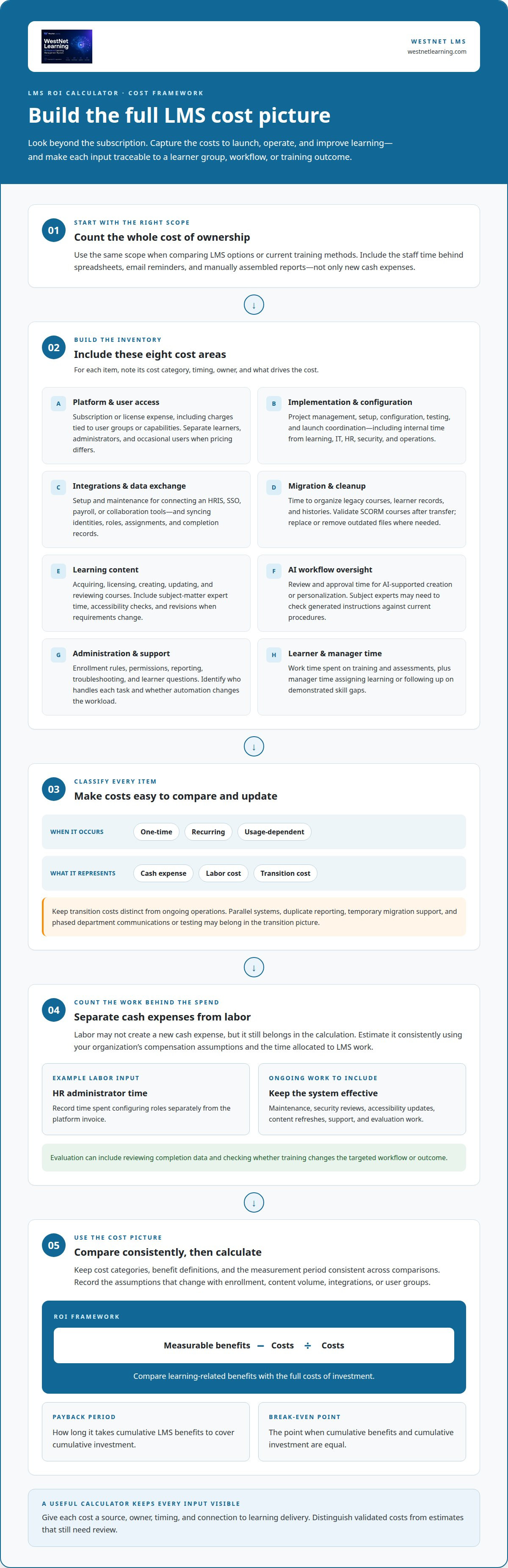
Include every expense required to launch, run, and improve the learning management system. A useful LMS ROI calculator template for 2026 separates one-time implementation costs from recurring operating costs, then connects each item to a learner group, workflow, or training outcome. This prevents a low platform fee from masking migration, administration, or employee time.
Start with the full cost of ownership, not just the subscription. For each item, record its cost category, timing, owner, and whether it changes with user numbers or course volume. Apply consistent assumptions throughout the comparison period, especially when comparing current training with a future LMS workflow.
- Platform and user access: Include the LMS subscription or license expense, plus any charges that apply to relevant user groups or capabilities. Separate active learners, administrators, and occasional users if the pricing model treats them differently.
- Implementation and configuration: Capture project management, setup, system configuration, testing, and launch coordination. Include internal staff time from learning, IT, HR, security, and operations teams.
- Integrations and data exchange: Account for connecting systems such as an HRIS, SSO, payroll, or collaboration tools. Include setup and maintenance work for syncing identities, roles, course assignments, and completion records.
- Migration and cleanup: Include time spent organizing legacy courses, learner records, and completion histories. A SCORM course may need validation after transfer, while outdated files may require replacement or removal.
- Learning content: Count the cost of acquiring, licensing, creating, updating, and reviewing courses—whether produced internally or sourced from educational platforms like NAVO. Include subject-matter expert time, accessibility checks, and revisions when policies or job requirements change.
- AI workflow oversight: If AI supports course creation or personalization, include review and approval time. For example, a subject expert may need to check generated instructions against current procedures before release.
- Administration and support: Include ongoing work for enrollment rules, permissions, reporting, troubleshooting, and learner questions. Identify who handles each task and whether LMS automation changes that workload.
- Learner and manager time: Record the work time employees spend completing training, taking assessments, and discussing results. Include manager time for assigning learning or following up on demonstrated skill gaps.
Separate cash expenses from labor costs. Estimate labor consistently, using your organization’s compensation assumptions and the time allocated to LMS work. For example, record an HR administrator’s time configuring roles separately from the platform invoice. This helps show which costs automation may change and which remain necessary.
Distinguish direct costs from transition costs. Replacing a fragmented process may involve parallel systems, duplicate reporting, or temporary support during data migration. List these separately from ongoing operations, and note when each begins and ends. A phased rollout, for example, may require separate communications and testing for each department.
Use the same scope when comparing LMS options or current training methods. If the existing process relies on spreadsheets, email reminders, and manually assembled reports, include the staff time those activities consume. A training ROI measurement approach can help connect those operating inputs to outcomes without confusing savings with costs.
Separate required costs from optional enhancements. Mark each item as one-time, recurring, or usage-dependent, and identify what drives it. An LMS ROI calculation is more useful when every cost has a clear source, owner, and connection to learning delivery. This also gives payback analysis a consistent baseline.
Separate recurring subscription or license charges from one-time implementation expenses, such as project management, configuration, testing, and launch coordination. Include internal staff time, and account for any differences in user numbers or pricing across groups.
Include labor time, even when it does not create a new cash expense. Add recurring costs for platform maintenance, security reviews, accessibility updates, content refreshes, and support. Include evaluation work, such as reviewing completion data and checking whether training changes the targeted workflow or outcome. If costs vary with enrollment, content volume, or integrations, record the relevant assumptions so you can update the comparison consistently. Include transition and contingency costs where applicable, distinguishing planned expenses from estimates that still need validation.
When using outside evidence to inform assumptions, keep its scope clear and do not treat research participation or selection criteria as LMS cost data. The Digital Education Council Global AI Faculty Survey 2025 included perspectives from over 1,600 faculty across 28 countries. The selection includes the top 100,000 scientists by c-score or scientists with a percentile rank of 2% or above in their sub-field. The selection includes scientists with a sub-field percentile rank of 2% or above. Keep the calculator focused on costs that apply to the organization’s own learners, systems, and training workflows.
How to calculate LMS payback period and break-even point
The payback period estimates how long it takes cumulative LMS benefits to cover cumulative investment. Break-even is the point when those totals are equal. Calculate both using the same cost categories, benefit definitions, and measurement period. Otherwise, a promising result may reflect inconsistent inputs rather than stronger performance.
Begin with a baseline for your current training process. Record the time and resources required for course administration, reporting, learner support, and skills assessment. Then identify changes the LMS could plausibly affect. Automated assignment workflows, for example, may reduce manual enrollment work, while searchable learning records may simplify report preparation.
Tie each benefit to a measurable operational change. Count reduced administrative hours only when you can document the time saved and explain how that capacity is used. If staff time shifts to other work, report released capacity rather than cash savings. Count avoided spending separately, and only when an actual budget expense is removed.
Use consistent formulas and periods
For each period, subtract LMS costs from measured benefits to calculate net benefit. Payback occurs when cumulative net benefits equal the initial investment. In simplified form, payback period equals initial investment divided by net benefit per period. Use this shortcut only when benefits and costs remain reasonably stable. For a phased rollout, calculate each period separately.
In a spreadsheet, create one row for each month, quarter, or year. Choose a period that matches the reliability of your operational data, and use it consistently. Add columns for implementation costs, recurring costs, verified benefits, net benefit, and cumulative net benefit. Break-even occurs in the first period when cumulative net benefit reaches zero or more.
- Define the starting investment. Include implementation costs that occur before meaningful benefits begin, such as configuration, migration, and staff time.
- Estimate period benefits. Use changes connected to specific workflows, such as fewer manual training reminders or faster completion reporting.
- Subtract period costs. Include recurring platform operations, administration, content updates, and learner time where applicable.
- Track cumulative results. Add each period’s net benefit to the previous balance until it offsets the starting investment.
- Identify break-even. Mark the first period when cumulative benefits cover cumulative costs, and report the interval clearly.
Consider a company introducing an LMS in stages. The first department may incur setup and migration work before learners start using courses. Later departments add adoption and content activity, so benefits build over time. A single annual average can hide this ramp-up. A phased model shows how launch timing affects payback.
Separate direct savings from productivity value. If employees spend less time finding required learning, measure the time saved and the work that capacity enables. Don’t automatically count every saved hour as reduced payroll expense. Have finance classify the result as released capacity, avoided spending, or cash savings to prevent inflated totals.
Assessment results can strengthen benefit estimates when they connect learning with job performance. Compare demonstrated skills before and after a learning path, then relate the change to a relevant workflow measure. Don’t count course completion itself as a financial benefit. Completion measures activity, not proof of improved performance or business outcomes.
Finally, test the calculation against a slower adoption curve and later benefit realization. If payback shifts substantially, the decision depends on rollout pace, learner participation, and operational follow-through. A training dashboard approach can make period-by-period progress easier to interpret. Present the break-even period alongside its assumptions, not as a standalone promise.
What risks and assumptions affect LMS ROI calculations?
An ROI model is only as credible as its assumptions. A spreadsheet can overstate value if it treats enrollment as adoption, completion as skill growth, or released staff time as cash savings. Make every assumption visible, assign an owner, and link it to evidence such as usage records, assessment results, or operating reports.
Adoption is a central risk. A planned rollout does not mean employees will use assigned courses or managers will reinforce learning. Estimate adoption by role, department, and learning pathway rather than applying one organization-wide assumption. For example, desk-based employees may access training differently from frontline staff with limited computer time. A corporate LMS adoption framework can help connect participation assumptions with practical rollout conditions.
Distinguish access from engagement. A login records platform activity, not attention or mastery. Course completion records show that a learner finished, not that job performance changed. If you assign financial value to training, define the evidence chain: learning activity, assessment result, demonstrated skill, and a relevant work outcome.
Attribution is another challenge. Performance may change because of new equipment, revised procedures, staffing changes, or market conditions, not just learning. If a sales team improves after training while a new sales process launches, crediting the entire change to the LMS distorts the result. Record related initiatives and use cautious attribution when effects overlap.
Stress-test the assumptions
Model a conservative case, a central case, and an optimistic case. Change one assumption at a time, such as participation, completion, administrative time saved, or the delay before benefits appear. If a small change sharply shifts the break-even result, flag that input as decision-critical and explain how you’ll measure it after launch.
Treat AI-related assumptions separately. Faster course drafting does not automatically reduce total effort: review, correction, approval, and maintenance still take time. Measure the full workflow from source material to approved learning, including subject-matter review. To assess skill outcomes, test whether AI-supported personalization helps learners address relevant gaps rather than assuming it improves results by itself.
Assessment quality matters. A recall quiz may not predict performance on a complex task. Align assessment criteria with the capability a role requires, then use comparable assessments before and after learning. For example, a customer support pathway could assess how an employee handles a realistic service scenario, not just whether they remember policy terms. Keep assessment design consistent across teams and periods.
Poor data quality can weaken even a sound model. Duplicate learner profiles, incomplete completion records, inconsistent job roles, and delayed updates can misstate participation or skills coverage. Define the system of record for each measure. Reconcile learning records with workforce data before interpreting results, and document missing or changed fields rather than silently treating them as zero.
The measurement period also shapes the result. An onboarding program may affect readiness sooner than a leadership pathway, while migration and adoption can delay benefits during a platform rollout. Choose a measurement window that matches the learning objective. Don’t project an early improvement indefinitely. Review whether it persists as content, job demands, or staffing conditions change.
Finally, prevent double counting. If reduced administration time already appears as a productivity benefit, don’t add the same hours again as avoided labor expense. Separate cash savings, capacity released, risk reduction, and skills development. Review LMS options for your workforce needs when your assumptions depend on learning workflows, AI, or assessment capabilities.
WestNet LMS
WestNet LMS helps organizations connect learning delivery with workforce skills and measurable training goals. WestNet AI LMS brings learning, analytics, and gamification together, while AI Course Creator supports course development workflows. LMS Integrations connect learning with existing tools, and Off-the-Shelf eCourses offer ready-made training.
Consider these capabilities when your ROI model highlights fragmented learning systems, manual course workflows, or difficulty connecting assessment results with workforce needs. A connected learning environment can help you track participation and skills development, then refine training priorities using learning data. The right configuration depends on your systems, learners, and intended outcomes.
Discuss how WestNet LMS can support your learning and skills priorities with the WestNet LMS team.
Turn the calculation into a learning strategy
Use your next planning cycle to connect the ROI model with decisions leaders can act on. Assign an owner to each outcome, agree on how to capture evidence, and set a review schedule that fits your organization’s planning process. This creates a clear path from financial assumptions to workforce development decisions.
A well-maintained LMS ROI calculator template for 2026 can become more than an investment snapshot. Treat it as a working model that evolves with changing roles, skills priorities, and learning workflows. As assessment evidence accumulates, use it to refine which capabilities deserve attention and how learning supports business priorities.
WestNet AI LMS, AI Course Creator, and LMS Integrations can help organizations build a more connected approach to corporate learning. Take the next step with a focused discussion about your goals, systems, and skills priorities.
Contact WestNet LMS to discuss your needs, and move forward with a clearer learning strategy.