The best enterprise software end user training LMS may not be the platform with the longest feature list. Choose one that can support employee, customer, and partner learning, connect with the tools your organization already uses, and provide useful insight into training progress. Its fit depends on how well those capabilities align with your audiences and goals.
It makes sense to look beyond course delivery: training employees, customers, and partners can involve different access, content, and reporting needs. This guide explains how to compare enterprise software end user training LMS platforms, which integrations to consider, and how enterprise systems differ from traditional LMSs.
You’ll also find a practical comparison of platform options and a decision guide to help narrow your choice. Use it to focus on the capabilities that matter most, from supporting distinct learner groups to connecting learning activity with business needs.
Key Takeaways
- Map the needs of employees, customers, and partners before selecting a platform, since each group may need different learning paths and access.
- Compare how platforms handle integrations, reporting, and learner growth rather than relying on feature lists alone.
- Use scale and audience needs to distinguish an enterprise LMS from a traditional system designed for a more contained learning environment.
- Evaluate how security controls, single sign-on, and data protection fit your organization’s requirements.
- Explore how WestNet AI LMS, AI Course Creator, LMS Integrations, and Off-the-Shelf eCourses can support a connected training approach.
Employee, customer, and partner training
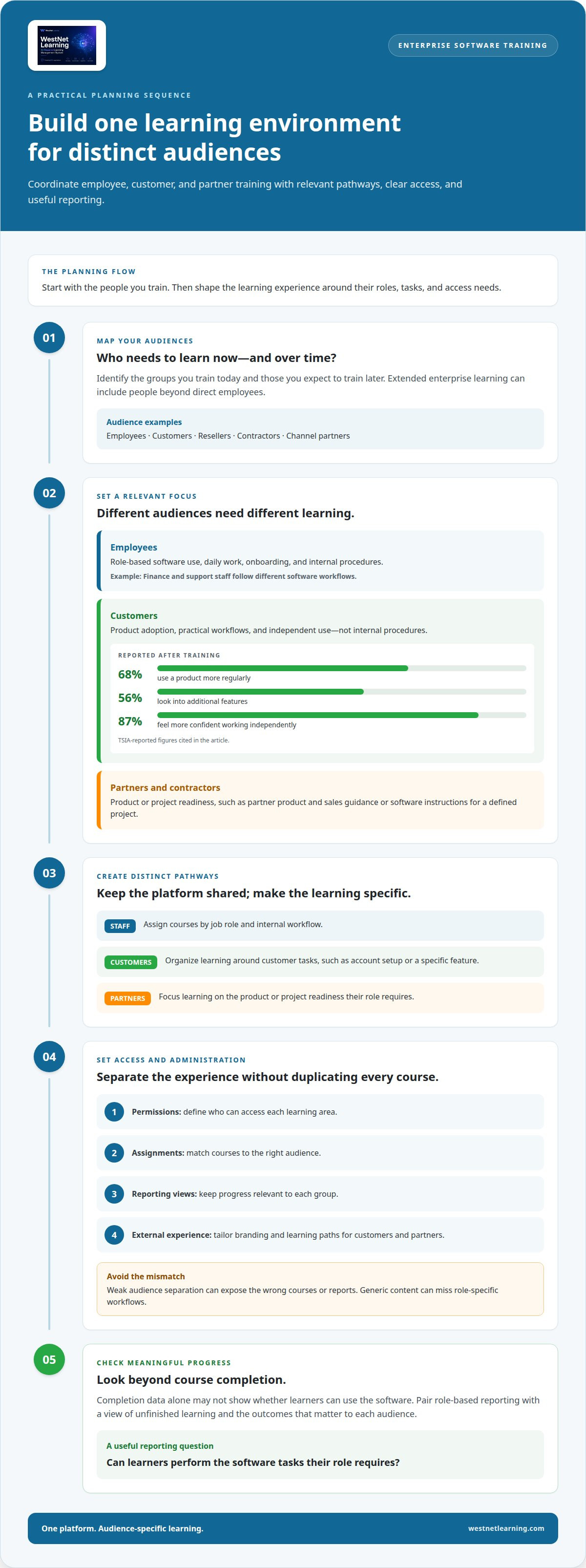
Plan enterprise learning around each audience’s role, access needs, and expected outcomes. Map the groups you train now and those you expect to train over time.
An LMS can centralize training, but weak audience separation can expose the wrong courses or reports. Generic content may miss role-specific workflows, and completion data alone may not show whether learners can use the software.
Employee Training
Employee training prepares staff to use enterprise software in daily work, from completing transactions to following internal processes. Unlike customer or partner learning, it can align course pathways with job roles, onboarding, and internal procedures. For example, assign finance employees a different software workflow from support staff, then use role-based reporting to identify unfinished learning.
Customer Training
Customer training focuses on product adoption, practical workflows, and independent use rather than internal procedures. TSIA reports that 68% of customers use a product more regularly after training, 56% look into additional features, and 87% feel more confident working independently with a tool. Organize learning around customer tasks, such as setting up an account or using a specific feature.
Centralized Training Across Audiences
A centralized LMS can give employees, customers, and partners access to learning through one platform, while audience-specific pathways keep content relevant. Set distinct permissions, course assignments, and reporting views for each group. Tailor branding and learning paths for external audiences without duplicating every course. This approach coordinates separate audiences within one learning environment.
Extended enterprise training includes people beyond direct employees, such as contractors, channel partners, and customers. A partner may need product and sales guidance; a contractor may need software instructions for a defined project. Separate enrollment and access rules help keep each audience’s learning focused. For broader scale decisions, consider the factors behind mid-market companies leaving enterprise platforms.
Compare the training options by audience and delivery priorities:
| Option | Audience | Primary focus | Design emphasis |
|---|---|---|---|
| Employee training | Staff | Role-based software use | Internal workflows |
| Customer training | Product users | Adoption and product tasks | Feature-based pathways |
| Partner training | Resellers and contractors | Product or project readiness | Audience-specific access |
| Centralized training | All three groups | Coordinated learning | Shared platform, distinct pathways |
Choose centralized delivery when shared administration matters, then tailor pathways and access to each audience.
What is an Enterprise Learning Management System?
An enterprise learning management system organizes learning for large, distributed organizations and connects courses, audiences, and reporting. After a software change, update the affected course, test its steps against the new interface, and publish the revised version.
For example, a company rolling out a new customer relationship management workflow can use an LMS to assign role-specific courses, track completion, and identify where learners need support. Enterprise systems can also connect learning reports with business outcomes, rather than only recording course completions.
Learning Paths and Content Curation
Learning paths group courses into a sequence suited to a role, task, or skill level. A new software user might start with account setup, then progress to data entry and reporting. Adaptive learning can adjust the next activity based on a learner’s answers or progress. AI-driven content curation can help organize relevant material, while translation can make courses accessible across language groups.
Analytics and Learner Follow-Up
Analytics can show patterns in enrollment, progress, assessment results, and course completion. For example, a manager can identify whether learners repeatedly miss a step in a software simulation, then revise the lesson. Automated follow-up can remind learners about unfinished courses or direct them to a next activity. Strong reporting connects these signals with business outcomes, rather than treating completion as the only measure.
Branded Portals and Learning Delivery
Branded portals give different audiences a consistent entry point, with tailored courses and visual identity for each group. A software company might provide customers with a product academy while employees access internal process training. Multi-channel delivery can make learning available through web-based courses and connected workplace tools, helping learners reach relevant material within their existing workflows.
Keep software training current with a repeatable release process. When an interface or workflow changes, identify affected courses, revise screenshots and instructions, then test the learner experience before publishing. Assign an owner to review course content against release notes, and retire outdated versions so learners don’t follow obsolete steps.
- Match each course to a software role or task.
- Review assessments and learner feedback for confusing steps.
- Update affected content after product changes.
- Track completion and performance trends after republishing.
For teams developing revised lessons, AI course creation workflows can help structure course materials for review and delivery.
Enterprise LMS platform comparisons
Compare platforms against real software workflows, learner volume, integrations, and data protections. For simulations, prioritize systems that let learners practise tasks and receive feedback. Compare the authoring workflow and how results appear in reports.
Security and privacy requirements depend on the data handled and the jurisdictions involved. Evaluate single sign-on (SSO), encryption, security testing, and access controls; GDPR, HIPAA, and ISO/IEC 27001 are examples to consider when assessing relevant obligations and safeguards.
Start with scale. A platform that suits a 50-person team may not suit 5,000 learners, and enterprise systems should be assessed for growth through a 40,000th learner. Next, compare the learner experience: an intuitive interface should make it clear where to find a course, practise a skill, and resume learning.
Use the table to compare platform profiles, not vendor promises. Each row highlights a different capability emphasis; assess fit against your software tasks, integrations, and reporting needs.
| Platform option | Practice | Integration emphasis | Useful comparison point |
|---|---|---|---|
| Standard course LMS | Lessons and quizzes | Course delivery | Basic workflow coverage |
| Simulation-enabled LMS | Guided software tasks | Simulation tracking | Practice feedback |
| SCORM-compatible LMS | Packaged course activities | SCORM content | Existing course reuse |
| API-connected LMS | Course-based practice | Business systems | Data exchange needs |
| Cloud LMS | Online learning activities | Cloud services | Access across locations |
| Multi-audience LMS | Role-based practice | Audience management | Separate learner groups |
| Branded portal LMS | Portal-based learning | Portal identity | Audience experience |
| Analytics-led LMS | Measured activities | Reporting tools | Outcome visibility |
| Mobile-oriented LMS | Short learning activities | Mobile access | Device usability |
| AI-enabled LMS | Adaptive activities | Content tools | Personalization approach |
| Compliance-focused LMS | Assessments and records | Compliance reporting | Audit evidence |
| Enterprise-scale LMS | Large learner programs | Enterprise systems | Growth capacity |
For each option, test the same software task. Ask a learner to complete a workflow, recover from an error, and find the next step. Compare completion evidence, feedback, and reporting. A 50-person pilot can reveal usability issues, but compare capacity against the organization’s larger learner forecast.
Then assess security controls together, not as isolated checkboxes. Review SSO, encryption in transit and at rest, role-based access, regular security audits, and security testing. A structured enterprise LMS security evaluation can help organize this review. Choose the platform whose practice, integration, usability, and controls align with your software workflows and projected scale.
Before committing, pilot an enterprise LMS with real courses and learners to confirm it supports practical workflows and meets learner needs.
Enterprise LMS definition and differences from traditional LMSs
A traditional LMS may suit an organization with a more contained learner group. An enterprise LMS supports thousands to millions of users across regions, with learning programs organized for larger, more varied organizations.
Scale changes the operating model. A department may use one course catalog, while a large enterprise needs separate audiences, permissions, and reporting views. Employees in one region may need software training aligned with local workflows, while another group follows a different pathway. The platform must keep these experiences manageable without losing oversight.
Traditional systems can suit a contained program with a defined learner group and straightforward administration. Enterprise platforms address broader coordination across business units, locations, and learner populations. This distinction matters when software training reaches employees, contractors, customers, and partners. A system designed only for internal learners may not support the access model or reporting structure those audiences require.
Benefits depend on how well the platform supports the organization’s learning operations. Centralized administration can bring course assignments and progress tracking into one environment. Role-based access can separate learners and content. Enterprise reporting can help leaders connect learning activity with business outcomes, rather than viewing completions alone. Fully mobile-responsive access can help employees reach training away from a desk.
Compare both LMS types against operational needs, not labels. Use these questions to guide the decision:
- Audience: Does the system serve employees only, or external learners too?
- Scale: Can it support growth from current enrollment to a 40,000th learner?
- Structure: Can administrators organize learning by region, role, or business unit?
- Tracking: Can reports show progress across groups and relevant outcomes?
- Access: Can mobile learners reach the same assigned learning as desktop users?
Test those criteria with one software course and representative learners. A 50-person team may find a standard LMS intuitive, yet that experience alone doesn’t establish fit for 5,000 learners. Compare the administrative workflow, learner access, and tracking needs at both scales. Include regional teams if the enterprise operates across locations.
Enterprise learning also requires consistent governance. Assign responsibility for course ownership, review access rules, and define how progress reports reach managers. A software update may affect one department’s workflow but not another’s. An enterprise platform should make it possible to target relevant learning without obscuring organization-wide progress. Choose a traditional LMS for a contained learner community; choose enterprise capabilities when regional scale, varied audiences, or centralized oversight shape the requirement.
What features should an LMS have for enterprise software end-user training?
Prioritize features that connect practice, learner access, security, and operational support. An LMS for organizations training 500 employees or 50,000 employees across locations needs controls that remain usable as programs grow.
Start with software-specific practice. Learners should be able to follow a workflow, apply a feature, and see whether they completed the task correctly. For a new expense system, a course could guide an employee through entering and submitting a claim. Assess how the platform records activity and helps learners resume after an interruption.
Integrations matter because training sits alongside business systems. Extended enterprise LMSs commonly integrate with contractor management systems and CRMs. Map systems that supply learner information or support training workflows, then assess how the LMS connects. Single sign-on (SSO) can give learners one login across products and an academy, reducing friction between business tools and training.
Security evaluation should examine controls as a connected set. Consider encryption in transit and at rest, role-based access controls, regular security audits, and security testing. GDPR and HIPAA are examples of regulations relevant to protecting sensitive data; ISO/IEC 27001 is also an example to include when assessing security and compliance needs. Match these considerations to the data and audiences involved.
- Access: Assess SSO, permissions, and learner access across locations.
- Practice: Test a real software workflow and review the learner’s feedback.
- Integration: Identify relevant systems, such as a CRM or contractor management platform.
- Reporting: Review whether reports help connect learning activity with business outcomes.
- Support: Evaluate how the LMS provider handles issues that arise at 2 a.m.
Delivery should also accommodate different learning preferences. The North American Association for Environmental Education notes that learners may prefer working alone or in groups, and learning by reading, listening, watching, or touching. A software course might combine written steps, a narrated walkthrough, and hands-on practice so learners can engage with a workflow in different ways.
Test the learner experience on mobile devices and desktop computers, then review completion and assessment reports. A platform that works for a small pilot still needs to support the organization’s wider audience and access patterns. Use a representative course, learner group, and integration in a pilot. For a structured review of controls, use this enterprise e-learning security evaluation as part of your platform assessment.
WestNet LMS
WestNet LMS can help bring employee, customer, and partner learning into a more connected training program. WestNet AI LMS combines automated course creation, analytics, and gamification to support personalized employee development. AI Course Creator helps develop course content, while LMS Integrations connect learning with existing tools. Off-the-Shelf eCourses provide ready-made learning content.
Consider these offerings when your priorities include coordinating different audiences, building courses, connecting systems, or adding ready-made content. The right starting point depends on your current training workflows and the capabilities you want to strengthen. Contact WestNet LMS to discuss how these options may fit your training goals.
Turn your platform decision into lasting progress
The right enterprise software end user training LMS becomes part of how your organization manages change, not a separate task after software launches. Treat learning content as an operational asset: connect course ownership to software updates, assign responsibility for revisions, and use learner feedback to improve instructions. This creates a repeatable process for keeping training relevant as workflows evolve.
Set a clear next step by identifying the software workflow that needs stronger learning support. Define who will maintain the content, how learners will access it, and what evidence will show that training is useful. With those decisions in view, you can shape a learning environment around real organizational needs and future changes.
Contact WestNet LMS to discuss your training needs and explore a practical path forward. Build a program that helps people approach each software change with greater clarity and confidence.
Frequently Asked Questions
How do you choose an enterprise LMS?
Choose the platform that best supports learners’ actual tasks and your training operations. For an enterprise software end user training LMS, start with a representative workflow, such as teaching staff to process a software request. Assess how learners practise it, how administrators assign it, and what reports show afterward. Then map required integrations, access groups, and content ownership. Evaluating real courses and representative learners reveals practical gaps better than a feature list.
What Are the Benefits of Using an Enterprise LMS?
An enterprise LMS can bring learning administration, content delivery, and progress information into a coordinated system. A manager can assign software training to a team, while learning administrators review participation across departments. This structure can help identify where learners need follow-up and where course materials need revision. Its value depends on using the information to improve training, not simply storing courses in one place.
How do you evaluate the scalability of an LMS for a global workforce?
Evaluate scalability by modeling how learner groups, locations, and administration needs may change. Map current and expected audiences, then examine how the platform separates courses, permissions, and reports across regions. Include a global scenario with different time zones, languages, and access patterns. During a pilot, test the administrative workflow and learner experience with representative users, then assess whether the same approach remains manageable as enrollment and organizational complexity increase.
How does an enterprise LMS differ from a traditional LMS?
An enterprise LMS is designed for broader organizational coordination, while a traditional LMS may fit a more contained learning program. The practical difference appears in administration: a large organization may need separate course access for business units, managers, and external audiences. Assess how each system handles ownership, reporting, and change management. For example, determine who can update a course and how that revision reaches affected learners.
How does an enterprise LMS drive business growth?
An enterprise LMS can support growth by helping people learn the software and processes required for new responsibilities. A growing sales team, for instance, can use role-specific learning to understand updated product workflows, while managers track assigned training. Learning data can also reveal recurring knowledge gaps that affect work processes. These insights can inform decisions, but business impact depends on connecting training activity to operational goals.
How is an enterprise LMS different from a standard LMS?
The distinction is usually the breadth of operational needs, not simply the system’s label. A standard LMS can serve a focused program with one administrator and a consistent learner group. An enterprise LMS may need delegated administration, distinct audiences, and coordinated reporting across business units. Compare a typical assignment, such as new software onboarding, from enrollment through reporting to see whether the platform fits your governance model.
What are the common use cases for an enterprise LMS?
An enterprise software end user training LMS can support employee onboarding, software rollout training, compliance learning, customer product education, and partner enablement. A software rollout may require introductory lessons for all staff and deeper task guidance for specialist teams. Contractors may need project-specific access, while customers need product-use instruction. Define the audience, task, and desired evidence of learning for each use case before organizing courses.
What does an enterprise LMS cost?
The price depends on the case and is provided after a quote request; factors include learner volume, required integrations, and content needs. An organization with multiple learner groups may also need to account for how its training program is structured. Compare proposals using the same assumptions about audiences, implementation requirements, and ongoing platform use. This makes it easier to understand which capabilities and services are reflected in each quoted solution.