A new LMS can be ready to launch before its people are ready to use it. Change management for a new LMS rollout helps close that gap by explaining why the system is changing, preparing people for new workflows, and making support available as they learn. Adoption grows when leaders communicate clearly, training reflects what each role actually needs to do, and teams respond to friction instead of treating launch day as the finish line.
It’s natural to focus on configuration, content migration, and integrations, all essential parts of implementation. But people also need to understand what is changing, how it affects their work, and where to turn when something is unclear. Without that foundation, even a capable platform can be underused.
This guide explains how to build adoption from the start: brief managers before the announcement, prepare learners with practical role-based guidance, monitor meaningful adoption signals after launch, and use feedback to resolve issues. The result is a more deliberate transition, with a clear path from rollout communications to sustained use.
Key Takeaways
- Prepare sponsors, managers, employees, and change champions with guidance matched to their responsibilities and day-to-day workflows.
- Explain why the LMS is changing, what each group needs to do, and how people can share questions or concerns throughout the rollout.
- Track meaningful adoption signals beyond log-ins, then use learner feedback and support trends to identify and resolve friction.
- Combine practical system training with opportunities to practice new behaviors, and reinforce learning after launch.
- Plan implementation in clear phases, with ownership, testing, and adoption measures built into the process.
1. Why are LMS Transitions a Defining Moment for Institutions?
A new learning management system changes more than where employees find courses. It can affect enrollment, completion tracking, reporting, and how managers support development. Change management for a new LMS rollout should prepare people for specific changes in their work, not just introduce new screens. Start by comparing current workflows with the processes planned after launch. This reveals where employees, instructors, administrators, and managers need practical guidance.
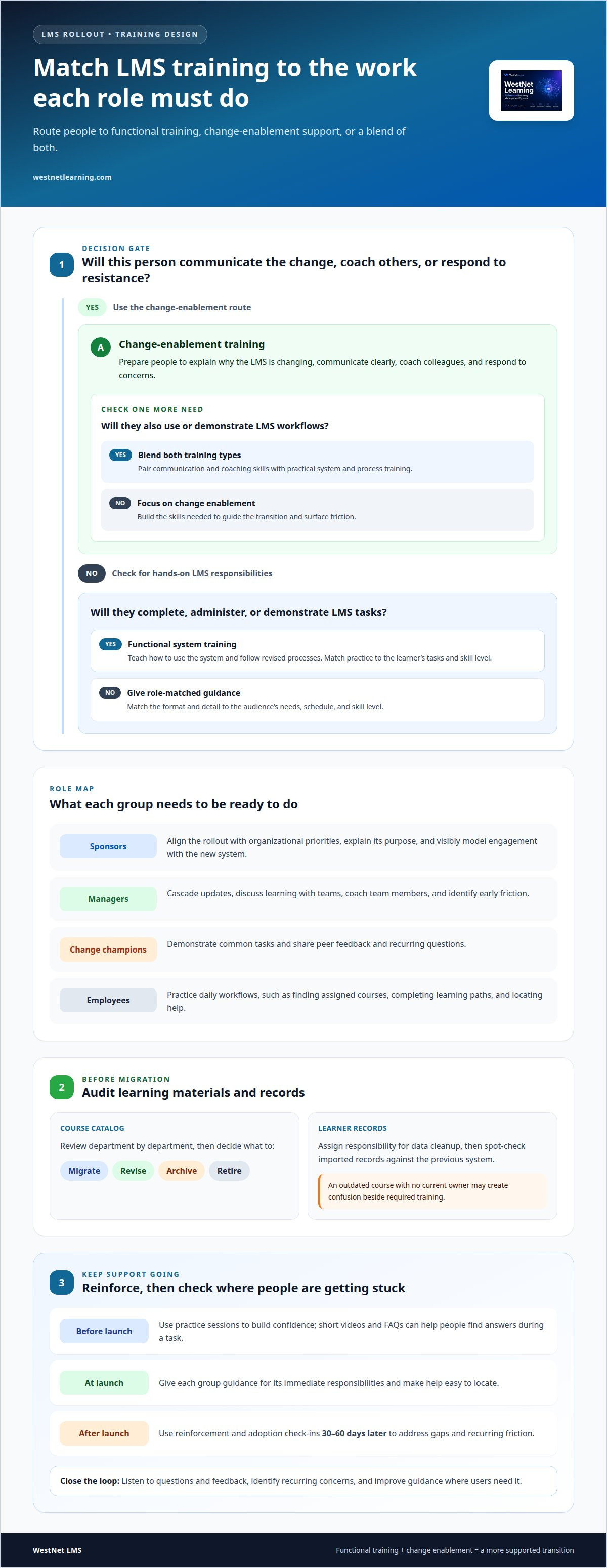
Build distinct training journeys for sponsors, managers, employees, and change champions. Before launch, sponsors align the rollout with organizational priorities and communicate why it matters. Managers learn to cascade updates, coach team members, and identify early friction. Change champions, selected from different departments, can demonstrate workflows and share peer feedback. Employees need task-focused practice, such as finding assigned courses, completing learning paths, and locating help. At launch, each group needs guidance for its immediate responsibilities. After launch, reinforcement and adoption check-ins 30–60 days later help teams address gaps.
- Sponsors: Explain the purpose and visibly model engagement with the new system.
- Managers: Discuss learning during team meetings and one-on-one conversations.
- Change champions: Demonstrate common tasks and surface recurring questions.
- Employees: Practice the workflows they will use in daily work.
Audit training materials and learner records before migration. Review the course catalog department by department, then decide what to migrate, revise, archive, or retire. For example, an outdated course with no current owner may create confusion if it appears beside required training in the new system. Assign responsibility for data cleanup, and spot-check imported records against the previous system. Where training supports employee risk management, reliable course records also help teams track assigned learning and completion.
Match training to learners’ skill levels, schedules, and needs. A new instructor may need practice building or updating a course, while an experienced learner may need a concise job aid for a changed workflow. Use online modules, live guidance, or a blended format to suit the audience. Short videos and FAQs can help employees find answers during a task, while practice sessions build confidence before users perform it independently.
Separate system training from change-enablement training, then connect the two. Functional training explains how to use the system and follow revised processes. Change-enablement training prepares sponsors and managers to communicate, coach, and respond to resistance. Together, they give people the task knowledge and support skills needed to make the transition work.
2. Communicating the reasons and timing for the rollout
Explain the purpose before announcing the launch date. A useful message connects the new platform to familiar needs, such as easier access to training, career development, or visibility into required courses. Avoid presenting the change as a software upgrade alone. Describe what will improve for each audience and how daily routines will change.
Give every stakeholder group the same core facts, then tailor the details. Employees need to know how to access courses and raise questions. Managers need the timeline, their role in reinforcing learning, and a way to report team concerns. Executives should understand the business goals and visibly support the transition, whether through team briefings or organization-wide hybrid presentations supported by technical production teams like Straight Street Event Services. A shared message prevents departments from explaining the rollout in conflicting ways.
Set expectations with a clear sequence. LMS implementation can take several weeks to several months, so communicate milestones as they become firm rather than implying every stage happens at once. The suggested timeline places software launch and the start of employee training in weeks 11–12. Explain what users can expect before that point, such as progress updates, a pilot, or instructions for accessing the new system.
- Before launch: Explain why the organization is changing, what the new platform will support, and when users will receive practical guidance.
- During preparation: Share relevant milestones, course availability, and any actions users need to complete.
- At launch: Provide access instructions, support channels, and a concise route for reporting problems.
- After launch: Share progress, acknowledge milestones, and tell users how their feedback has shaped improvements.
Make communication two-way. Resistance may point to real concerns, such as uncertainty about time, changed workflows, or whether existing courses will remain available. Invite questions through manager check-ins, feedback forms, or team discussions, then address recurring concerns directly. If employees say a required course is hard to find, explain the navigation path and improve the guidance where needed.
Keep updates specific and consistent. Each message should explain what is happening, why it matters to that audience, and what action comes next. For example, a launch notice can distinguish between employees who need to complete a course and managers who need to discuss progress with their teams. Clear timing reduces uncertainty, while practical instructions turn awareness into action.
Continue communicating after go-live rather than treating the launch announcement as the final message. Share completion progress, useful learner feedback, and changes made in response. A structured LMS adoption communication plan can connect these updates to ongoing adoption work.
3. Monitoring adoption and resolving post-launch issues
Common LMS implementation risks include low readiness, access errors, confusing courses, and workflows that disrupt daily tasks. Reduce these risks by assessing readiness before launch, monitoring usage afterward, and assigning owners to resolve employee issues.
Track more than log-ins. Course completions show whether learners finish assigned training, while skill development and performance improvements indicate whether learning supports their work. Compare these measures with clear adoption goals. A dashboard can help teams review LMS adoption metrics alongside error logs and support requests, so usage figures do not obscure practical problems.
During the first 30 days after launch, review tracking reports weekly. Look at sign-ins by team and where users drop off in their first course. If learners stop at the same step, inspect the instructions, course structure, and access path. Short employee surveys can add context that system data cannot show. Fix confusing content, then communicate what changed.
- Usage: Review sign-ins, course starts, and completion patterns by team.
- Learning: Compare course completion with skill development and performance signals.
- Operations: Track support requests, error logs, and process compliance.
- Experience: Gather feedback about access, navigation, and course relevance.
From days 31 to 60 after launch, compare required-training completion rates with those on the previous system. Speak with managers whose teams lag, then distinguish between workload, unclear expectations, access barriers, and course difficulty. A lower completion rate needs investigation, not an automatic assumption that employees are resisting the platform.
Ask employees what feels most challenging, then use their answers to identify design or communication gaps. Give change champions and power users a clear way to report recurring problems. Share visible responses, such as revised instructions or a corrected course path, so feedback leads to action. When an issue needs broader correction, record its owner, next step, and status.
Keep adoption cyclical: compare results with goals, address the most significant friction, and review the measures again. A smooth rollout depends on readiness and continued support. Refresher training and help from experienced users can address learning gaps after launch. Use feedback, support trends, and outcome measures together to decide what to adjust next.
4. Blending functional and change-enablement learning
Teach people both how to use the learning management system and how to work through the change. Functional training covers tasks such as finding an assigned course, recording a completion, or updating training content. Change-enablement training addresses expectations, communication, and how leaders support new behaviors. For example, a manager needs to know where to view team progress and how to discuss learning during a check-in. Pairing these skills connects system actions with the routines that sustain adoption.
Align each learning activity with a business or learning goal. If the goal is stronger compliance tracking, show administrators how to assign required courses and review records. If the goal is employee development, demonstrate how learners find relevant learning paths and understand their next steps. Ask each stakeholder group what it needs to do differently, then make that task the focus of practice. Leaders can reinforce the connection by explaining how the new process supports organizational priorities.
Prepare the content before moving it. Review materials department by department, and decide what to migrate, exclude, or update. This work can take months for each department, so begin with a clear inventory of course owners, audiences, and current relevance. For example, a safety course may still be essential but need revised instructions, while an obsolete orientation module may belong in an archive. Keep the catalog aligned with current expectations rather than transferring every item unchanged.
Design practice around decisions employees make on the job. A learner can complete a short course, locate its completion record, and return to the relevant resource. An instructor can rehearse publishing an updated module, while an administrator practices assigning it to the correct group. Use realistic scenarios and let participants repeat workflows after feedback. Practice reveals confusing steps before people depend on them in daily work.
- Demonstrate: Show one complete task, such as locating a required course.
- Practice: Ask learners to repeat the task in the new system.
- Apply: Connect the task to a real process, such as recording compliance completion.
- Reinforce: Provide a guide or video learners can use during work.
Put learning inside the system where possible, so users can practice in the environment they will use. Guides, videos, and drop-in support can reinforce formal sessions when questions arise. For compliance programs, connect course workflows to clear expectations for assignment, completion, and recordkeeping. This keeps compliance training tied to practical actions. Combine instruction with communication and coaching, then revise materials when real use reveals a gap.
5. Why Does Change Management Matter in LMS Implementation?
Software implementation delivers more than a working platform. It should connect organizational goals, redesigned workflows, and employee readiness. Prosci’s Best Practices in Change Management, 12th Edition reports that 88% of respondents with excellent change management met or exceeded project objectives. The same report found that 13% of respondents with poor change management met or exceeded them. These findings underline why teams should prepare people alongside the technology.
Start with measurable goals tied to business priorities. A compliance initiative might track required-course completion and reporting accuracy, while a development initiative might measure participation in role-relevant learning paths. Define the baseline, audience, metric, and review method before implementation begins. Assign an owner to each measure so a dashboard informs decisions rather than simply collecting data.
A phased launch introduces the system to selected departments first, giving teams a chance to learn from feedback before wider deployment. An organization-wide launch gives everyone access at once, but requires coordinated readiness, support, and communication across affected teams. The right approach depends on workflow complexity, integration needs, audience readiness, and the organization’s capacity to support users.
LMS implementation and change-management costs depend on project scope and are provided after a quote request. Configuration, integrations, data migration, training, and support all shape the work involved.
Structure implementation around six phases: discovery, configuration, migration, integrations, testing and a pilot, then go-live with the first 90 days. Give every phase a decision owner, completion criteria, and escalation path. For example, the migration lead owns data quality, while business stakeholders approve course priorities and user roles. Where professional implementation support is involved, define its scope and handoffs with internal teams before work begins.
- Discovery: Map current workflows, goals, and affected groups.
- Configuration: Confirm user roles, permissions, and required system settings.
- Migration: Assign responsibility for course and record preparation.
- Integrations: Coordinate connected systems and business owners.
- Testing and pilot: Test user journeys and collect feedback before wider launch.
- Go-live and first 90 days: Track adoption, resolve issues, and refine the rollout.
Build a cross-functional implementation team with representatives from learning, HR, IT, compliance, and affected departments. Confirm each member’s responsibilities and time commitment before kickoff. A project owner with decision-making authority can resolve competing priorities, while a traceability matrix links tasks to owners and evidence of completion. This structure keeps decisions, technical work, and change support aligned from discovery through post-launch improvements.
WestNet LMS
WestNet LMS helps organizations connect learning technology with the practical needs of rollout and adoption. WestNet AI LMS supports corporate training, and LMS Integrations connect learning with existing tools. AI Course Creator supports course creation, while Off-the-Shelf eCourses provide ready-made learning content. Together, these offerings help teams bring training delivery, system access, and learner resources into a more cohesive environment.
Consider these options when planning a new platform, aligning training with employee roles, or addressing fragmented learning workflows. The right combination depends on your organization’s goals, content needs, and existing systems. A focused discussion can clarify how WestNet LMS offerings fit your rollout priorities.
Contact WestNet LMS to discuss your LMS rollout.
Build Adoption Into What Comes Next
Treat adoption as an ongoing operating priority, not a milestone that disappears after launch. As teams, roles, and priorities evolve, the learning environment should evolve with them. Assign an owner to connect decisions across learning, operations, and leadership, and make space for employees to raise emerging needs. This discipline helps the system remain relevant as work changes.
Effective change management for a new LMS rollout also means treating adoption as a capability the organization can strengthen over time. Use lessons from the initial transition to inform future process changes, new programs, and workforce development priorities. Focus on whether the platform supports the work people need to do, rather than treating implementation completion as the final measure of value. A durable approach gives leaders a clearer basis for deciding what to refine next.
Start with a conversation about where alignment matters most in your rollout. Contact WestNet LMS to discuss your next steps and move forward with a clear direction.
Frequently Asked Questions
Why Does Change Management Matter in LMS Implementation?
Change management matters because a technically functional system can still fail to fit employees’ actual work. It connects platform decisions to the behaviors and responsibilities that make learning usable. For example, if a new onboarding workflow assigns courses automatically, managers need to know what to do when a new hire’s role changes. Clarifying that responsibility prevents gaps between system configuration and everyday practice.
How Do You Prepare Your Organization for an LMS Rollout?
Prepare by identifying who will be affected and which work processes will change. Map a specific task, such as assigning onboarding courses, from its current steps to its future steps. Then identify who owns each decision, what information must move between systems, and where employees may need help. A short readiness review with department representatives can surface overlooked workflows before they become launch-day obstacles.
How can organizations measure change management success?
Measure success against a baseline and a defined organizational goal, not a single usage figure. For example, if the initiative aims to simplify onboarding, examine whether new hires can complete the intended learning sequence and whether managers can use the resulting records in their process. Review results by role or department, since a strong overall figure can conceal a group still facing access or workflow barriers.
What are the most effective change management strategies?
Effective strategies combine clear ownership, consistent leadership behavior, practical user involvement, and a way to act on concerns. Translate the change into specific role impacts: what employees will do differently, what managers will reinforce, and which decisions sponsors will make. Test messages and workflows with affected users before wider release. If feedback reveals a confusing step, revise the process or guidance and communicate the adjustment.
Why are LMS Transitions a Defining Moment for Institutions?
An LMS transition can reshape how an institution organizes learning, shares course information, and supports learners. In higher education, shared governance, academic freedom, legacy systems, and decentralized departments can complicate agreement. For example, faculty may need appropriate control over course design while administrators standardize access or reporting. Recognizing these concerns early helps institutions plan a transition that respects local practices and institutional priorities.
What are the key steps in change management for a new LMS rollout?
Start by defining the outcome the organization needs, then identify affected roles and workflow changes. Assign decision rights and task owners, prepare the system and learning materials, and test representative user journeys before wider release. Once the platform is live, evaluate whether intended work is happening and address barriers with named owners. This sequence connects adoption decisions to implementation work instead of treating them as separate activities.
How do you assess organizational readiness for a new LMS?
Assess readiness by examining leadership alignment, employee capacity, system access, and the quality of current learning processes. Ask department representatives to describe a real task, such as locating a required course or recording a completion. Note where they expect friction, what support they need, and whether existing roles are clear. Compare findings across groups to identify dependencies that could affect launch preparation.
How should you communicate an LMS rollout to employees and learners?
Use a message that tells each audience what is changing, why it matters to their work, and what action to take next. For a frontline team, explain where to find assigned learning during a shift; for a course administrator, clarify revised publishing responsibilities. Provide a consistent place for questions and share answers to recurring concerns, so employees receive practical guidance rather than conflicting updates.